Built by suppliers, for suppliers.
SupplyWise is an Australian wholesale ordering platform. Your customers order online or in the app, and every order, invoice and payment flows into Xero, MYOB or QuickBooks, so nobody re-keys a thing.
$1 per invoice. No per-user fees. No lock-in. Free for your customers.
New on the blogRecipes in SupplyWise: Know What You Make, Know What You've Got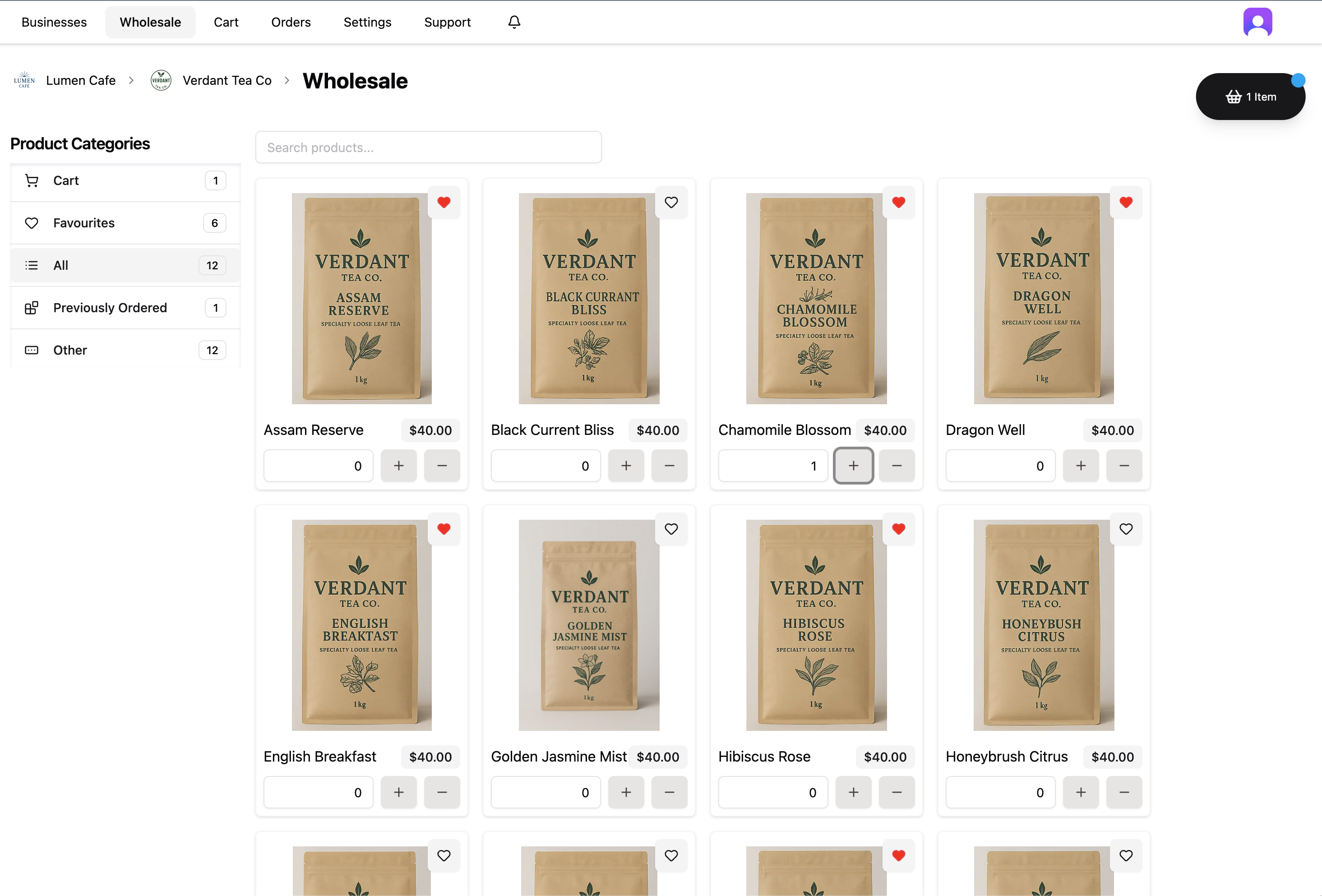
Trusted by premium suppliers
Join the thousands of businesses ordering through our premium suppliers.















- saved every week
- 30+ hrs
- Suppliers have saved more than 30 hours a week by moving their phone, text and email orders onto SupplyWise.
- per order
- $1
- It costs $1 per order with a $50 monthly minimum, and no setup fee, per-user fees or lock-in contract.
- free trial
- 30 days
- There is a free 30-day trial, so you can test the system before you commit.
- improvements in 2026
- 480+
- More than 480 improvements were released between January and November 2026, usually because a supplier asked for something.
Built to Run Wholesale at Any Size
Ordering, invoicing, payments and stock in one system, whether you are an owner-operator or a high-volume distributor.
Orders straight into your accounts
SupplyWise is an Australian wholesale ordering platform. Your customers order online or in a free app, and every order becomes an invoice in Xero, MYOB or QuickBooks Online.
From bakeries to distributors
It is used by bakeries, coffee roasters, food producers and trade distributors. The distributors sell packaging, parts, lubricants and food-service goods, with large product catalogues, warehouses and sales reps on the road.
Built to scale
Australian suppliers take orders through SupplyWise from thousands of cafes, restaurants, retailers and trade customers. It runs on cloud infrastructure that scales automatically and is built to handle millions of orders a month, so there is no limit on orders or users at any size.
One system, not five
Stock levels, purchasing from your own suppliers, reading emailed PDF purchase orders, sales reps ordering for customers and a retail online store are all part of the same system.
Your data stays yours
Your data stays yours. Orders, customers, products, price lists, stock and payments can be exported to spreadsheets from the dashboard at any time, including if you decide to leave.
Need something we don't do yet?
If something you need is not in SupplyWise yet, ask us before you rule it out. We build quickly for the suppliers we work with, and features they have asked for have gone live within days. Every release is listed on the What's New page.
Stop Losing Orders to Phone Calls & Spreadsheets
Your customers order online, and every order lands in one place, so you stop juggling calls, texts and spreadsheets. Here is what happens to an order.
- 1
Your customers order online
Invite your customers and they order from your catalogue at their own prices, on the web or in the free iPhone and Android app. They reorder from favourites or their last order, or set a repeating order.
- 2
Phone, text and emailed orders still fit
Enter an order for a customer yourself, or drop in the PDF purchase order they emailed and SupplyWise reads it into an order for you to approve.
- 3
Pick, pack and deliver
Every order lands in one inbox, sorted by your delivery days and cut-off times. Print picking slips, delivery slips and invoices, book Australia Post, or plan delivery runs.
- 4
Invoices and payments reach your books
Each order becomes an invoice in Xero, MYOB or QuickBooks Online. Customers pay by card, direct debit or bank transfer, or on their usual account terms, and payments are matched to the invoice.
Works With Xero, MYOB and QuickBooks
Connect your accounting software once. Invoices and payments are sent across as orders come in, so there is no double entry and nothing to re-key at the end of the week.
Accounting
Xero
Invoices, credit notes and payments sent to Xero for you.
- Invoices and credit notes created in Xero as orders come in
- Payments recorded against the right invoice
- Customers linked to your Xero contacts
- Payments recorded in Xero flow back into SupplyWise
- Payouts recorded in Xero so your bank feed reconciles
- Your custom SKUs flow through to every invoice line
Accounting
MYOB
Invoices and payments sent to MYOB and reconciled for you.
- Invoices sent to MYOB with customer PO numbers
- Payments and payouts reconciled automatically
- Customers linked to your MYOB contacts
- Payments made in MYOB flow back into SupplyWise
- Supplier purchase orders created in MYOB, with the option to turn them into bills as stock is received
- Stock counts and adjustments can be sent to MYOB, and you can check your stock against MYOB's
Accounting
QuickBooks Online
Connect QuickBooks Online and keep your books in step with every order.
- Invoices and credit notes created in QuickBooks as orders come in
- Payments and payouts reconciled automatically, fees included
- Customers linked to your QuickBooks customers
- Payments made in QuickBooks flow back into SupplyWise
Payments
Stripe
Connect your own Stripe account to get paid at checkout.
- Card, Apple Pay and Google Pay at your online store checkout
- Payments go straight into your own Stripe account
- Stripe fees recorded against each order
- Payouts matched to the orders they cover
Shipping
Australia Post
Works with your own MyPost Business or eParcel contract account.
- Create shipments and print labels straight from the order
- Live shipping prices shown to customers at checkout
- Heavy orders split into multiple parcels automatically
- Track every shipment from the order page
Delivery routing
OptimoRoute
Send the day's orders to OptimoRoute in a couple of clicks.
- Select orders and send them to OptimoRoute as deliveries
- Delivery dates and addresses go across exactly as shown
- Plan efficient runs for your drivers in OptimoRoute
Client Testimonials
What suppliers say about running their wholesale on SupplyWise.
The biggest benefit of joining SupplyWise is the time it saves. It gives me back close to an hour and a half every day, seven days a week. Ordering is streamlined, clear and neat, which makes the whole process from production to delivery so much easier. The value is huge: for what it saves in time and stress, the cost is peanuts. The team has been incredibly responsive and helpful, especially during setup. They're superstars at what they do, and I genuinely want to support what they're building.

Joining SupplyWise has been a great experience for us at Arthur Bakery. Our wholesale orders are now streamlined and effortless -- no more back-and-forth calls or messy paperwork. Customers can see our full range, reorder quickly, and everything flows straight into our systems without a hitch. It's taken the stress out of managing orders and given us back valuable time to focus on what we love -- baking and growing our business.

SupplyWise has completely changed the way we handle wholesale orders. Instead of juggling phone calls, texts, and spreadsheets, all our customers now order through one easy platform. The ability to create customer-specific price lists and let them reorder from favourites has saved us hours every week. On top of that, payments sync straight into our accounting system, so there's no more chasing or double entry. It's simple, reliable, and it's freed up our team to focus on growing the business rather than managing admin.

What changed for suppliers on SupplyWise
Bakery
Cup & Co Wholesale
- 24 hrs back every week
- 90% fewer delivery errors
- Daily payments instead of weekly
Cup & Co Wholesale went from an Excel spreadsheet and constant phone calls to an exact system, cutting delivery errors by 90%, improving cash flow straight away, and giving owner Simone back 24 hours a week.
Read the storyBakery
Arthur Bakery
- 30+ hrs saved every week
- Zero order errors
- First holiday in years
Arthur swapped orders by phone, text and email for one platform, eliminated order errors, saved over 30 hours a week, and went from working in the business to working on it.
Read the storyPatisserie
Corica Pastries
- 5x website sales
- 1 place for wholesale and retail orders
- Seconds to turn an emailed PO into an invoice
Corica took systems that worked and made them simpler, opened a brand-new retail market, and lifted website sales by 5x.
Read the storyMeet the Team
We have run a wholesale business in Perth since 2006. We built SupplyWise to fix the problems we had ourselves, and we still use it every day.

Alex Barile
Chief Financial Officer
Matt James
Chief Technology Officer
Peter Barile
Chief Operating Officer
Main Features Of SupplyWise
Everything you need to run your wholesale business, organised just like the app. Pick an area to see what it can do.
The full feature list on one pageAll 76 features across the 12 areas of SupplyWise.
Analytics
All the reports your business needs to see what's selling, who's buying and where to grow.
- Sales reports: Track revenue across days, weeks and months, by order date or delivery date.
- Product reports: See which products sell best, how much you've sold and the gross margin on each.
- Customer reports: Rank customers by spend and order volume, and spot who's growing.
- Products per customer: See exactly what each customer buys and how often.
- Product tallies: Total up every product across your orders so you know what to make, pick or pack.
- Product daily items: A day-by-day breakdown of product quantities to plan production and deliveries.
- Customer insights: Catch customers who are slowing down or haven't ordered lately before you lose them.
Orders
Every order in one place, from wholesale, retail and everywhere else, from the first click to delivery.
- One order inbox: Wholesale, retail and every other channel land in a single list, so nothing slips through.
- Order on behalf of customers: Create or edit orders for customers who still call or text.
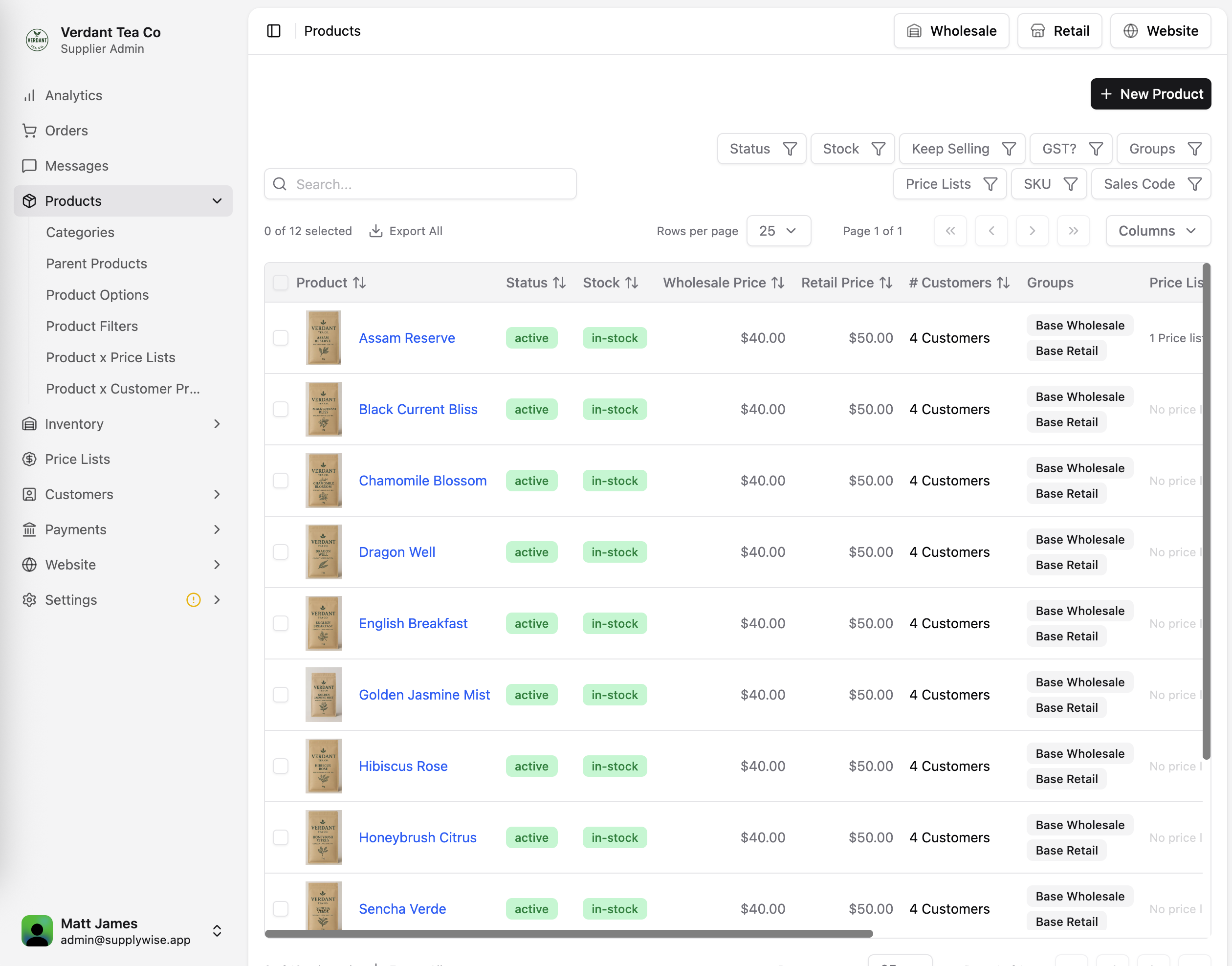
- Drop in a PO, get an invoice: Drop in a purchase order your customer sent as a PDF. SupplyWise reads it and matches each line to your products, and you approve it to create their order and invoice.
- Forward POs straight in: Redirect customer POs to your own SupplyWise PO email address and they're picked up for you.
- Expected orders: Get alerted when a regular customer hasn't placed their usual order.
- Picking slips & invoices: Print picking slips, packing slips and invoices as PDFs.
- Bulk actions: Update, print or invoice many orders at once.
- Australia Post shipping: Create shipments and print labels straight from the order.
- Route planning: Plan delivery runs with OptimoRoute integration.
- Backorders: Hold back out-of-stock items and fulfil them when stock arrives.
- Purchase orders: Raise purchase orders to your own suppliers.
Messages
Talk to your customers inside SupplyWise instead of across texts, calls and inboxes.
- Customer messaging: Chat with customers directly within SupplyWise.
- Conversation history: Every message is kept with the customer, so nothing gets lost.
- On the go: Reply from the SupplyWise mobile app wherever you are.
Products
A full catalogue with photos, options and categories, managed in one place.
- Categories: Organise your catalogue so customers find things fast.
- Parent products & options: Group sizes, flavours and grinds under a single product.
- Variable weight products: Sell by the kilo or gram and invoice for the exact delivered weight.
- Import & export: Bulk-update your catalogue by spreadsheet.
- Prices by price list: See and edit every product's price on every price list in one grid.
- Prices by customer: Set one-off prices for individual customers.
- Product filters: Let customers filter your range by the attributes that matter.
Inventory
Know what's on the shelf, what's coming in and what to reorder.
- Stock levels: Track stock as it's ordered and stop customers ordering more than you have.
- Supplier orders: Reorder from your own suppliers and track what's on its way.
- Stock alerts: See every item below its par level and raise a draft purchase order for each supplier.
- Pending stock: See stock that's been ordered but hasn't arrived yet.
- Incoming stock: Receive deliveries and update stock in one step.
- Stock counts: Run stocktakes and correct levels in a few taps.
- Recipes: Build products from ingredients so stock is used up automatically.
- Units and pack sizes: Buy, count and sell the same stock item in different units and pack sizes.
- Stock costs: Each item keeps its latest cost from supplier orders and bills.
- Audit log: A full history of every stock movement.
Price Lists
Tailored pricing so every customer sees the right products at the right price.
- Unlimited price lists: Create lists for wholesale, cafés, distributors or anything else.
- Discounts by list: Apply a percentage off or set exact prices per product.
- Control what's visible: Choose which products each list can see and order.
- Assign in seconds: Put customers on the right list and their pricing updates straight away.
Promotions
Run sales and promo codes on your online store without touching wholesale pricing.
- Automatic discounts: Run a sale on a product, a category or the whole order.
- Promo codes: Give customers a code to use at checkout.
- Percentage or dollar off: Choose how each promotion discounts.
- Start & end dates: Schedule promotions ahead and let them end on their own.
- Limits: Set a minimum order value or a cap on total redemptions.
Customers
Onboard, organise and look after your customers, all in one place.
- Easy onboarding: Invite customers or approve join requests so they can order in minutes.
- Visibility groups: Group customers to control which products they can see.
- Repeating orders: Set and forget recurring orders to save time and manual work.
- Statements: Send account statements automatically on your schedule.
- Payment terms: Set terms, credit limits and ordering blocks per customer.
- Credit notes: Issue credits for returns, shortages or damaged goods.
- Retail subscriptions: Let online shoppers subscribe to regular deliveries.
- Sales reps: Assign reps to customers and track their accounts.
Payments
Get paid faster with card, direct debit and bank transfer, all reconciled for you.
- Flexible payment options: Accept card, direct debit, bank transfer or PayID. Bank transfer, PayID and direct debit have no payment fee.
- Payouts: See every payout to your bank account and what's in it.
- Payins: Track incoming bank transfers and match them to invoices.
- Awaiting transfers: See which customers still owe you at a glance.
- Bank mappings: Teach SupplyWise who's paying so transfers reconcile automatically.
- Payment errors: Spot failed payments early and follow them up.
Settings
Set SupplyWise up to run the way your business does.
- Integrations: Sync with Xero, MYOB, QuickBooks, Stripe and Australia Post to cut double handling.
- Unlimited users: Add as many team members as you like with no per-user fees.
- Shipping profiles: Different shipping options for different customers, products or regions.
- Delivery schedule: Set your delivery days and order cut-off times.
- Your stores: Run a separate retail store from the same products, with its own QR code.
- API keys: Connect your own systems through the SupplyWise API.
- Audit log: See who changed what, and when.
Help Assistant
An AI assistant that answers your questions about SupplyWise, any time of day.
- Instant answers: Ask how to do anything in SupplyWise in plain English.
- Accurate & up to date: Answers are based on how SupplyWise works today.
- Always on: Help at 5am before a delivery run or late after close.
White Glove Website
Your own branded online store, set up by us and run from SupplyWise.
- Done for you: We build and launch your branded storefront for you.
- Shop built in: Products, prices and stock come live from SupplyWise. No double entry.
- Card checkout: Customers pay by card and orders land straight in your order inbox.
- Edit with AI: Ask for changes in plain English and see them on your site.
- Embed anywhere: Prefer your existing site? Embed the store in it.
Simple Pricing, No Surprises
One plan for every supplier, small or large: $1 per invoice for sales and $1 per purchase order for inventory, with a $50 monthly minimum, so what you pay grows with what you sell.
Full Access
Use sales, inventory or both. You only pay for what you use.
$50 minimum monthly spend
- Unlimited orders
- Unlimited users
- Sales & customer reporting
- Inventory management
- Routing optimisation
- Branded retail storefront
- Dedicated support
How the pricing works
- One invoice is one order
- 250 orders in a month costs $250. 900 orders costs $900. Prices include GST. Wholesale and retail orders count the same, and an order is counted once however it arrives or however often it is edited.
- Nothing per user, nothing per customer
- Unlimited team logins, and your customers join and order for free.
- No percentage of your sales
- The $1 is the same for a $50 order and a $5,000 order, however the customer pays.
- Payment fees are published
- Bank transfer, PayID and direct debit have no payment fee. Card payments cost the supplier 1.5% + 30c plus GST for Australian cards (Amex 1.75% + 30c, international cards 2.8% + 30c). Customers are never charged a surcharge: card surcharges have not been allowed in Australia since 1 October 2026.
- No setup fee, no lock-in
- Try it free first, and our team helps you get set up. No fixed term: billed monthly in arrears, and either side can end it with 30 days' written notice.
Questions Suppliers Ask Us
Straight answers on accounting sync, cost, contracts and how your customers get on board.
Been asked by a supplier to order through SupplyWise? It is free for you. How ordering works for buyers.
What is SupplyWise?
SupplyWise is an Australian wholesale ordering platform for suppliers. Your customers order online or in the mobile app instead of by phone, text or email, and SupplyWise handles the orders, invoices, payments and stock in one place, synced with Xero, MYOB or QuickBooks Online.
Who is SupplyWise for?
Suppliers who sell to other businesses: coffee roasters, bakeries, food and beverage producers, and distributors of packaging, parts and other trade goods. Suppliers on SupplyWise range from owner-operators to distributors with large product catalogues, a warehouse and sales reps on the road. Australian suppliers take orders through SupplyWise from thousands of cafes, restaurants, retailers and trade customers. It runs on cloud infrastructure that scales automatically and is built to handle millions of orders a month, so there is no limit on orders or users at any size. Suppliers include bakeries such as Arthur Bakery, Cup & Co Wholesale and Corica Pastries, coffee roasters such as Brew Coffee Roasters, Little Owl Coffee Roasters and Singular Roasters, and trade distributors such as Liberato. Their customers (cafes, restaurants, bars, hotels and retailers) join and order for free.
Does SupplyWise work with Xero, MYOB and QuickBooks?
Yes. Connect Xero, MYOB (AccountRight or MYOB Business) or QuickBooks Online and every order is sent across as an invoice against the right customer, with payments recorded against it, so nobody re-keys invoices. Customers are linked to your existing contacts. Invoices are sent automatically as orders come in, with no approval click. Xero and QuickBooks Online receive credit notes as their own documents, and in MYOB a credit goes across as a credit line on the invoice it is applied to. Payments you record in Xero, MYOB or QuickBooks Online flow back into SupplyWise, and SupplyWise payouts are recorded so your bank account reconciles. SupplyWise shows you any order that has not reached your accounting software, tells you if the connection drops, and lets you send it again. Exactly what syncs, for each of Xero, MYOB and QuickBooks.
Does stock and purchasing sync with MYOB too?
Yes, with Purchasing switched on. Purchase orders you raise to your own suppliers in SupplyWise are created in MYOB, and you can choose to have each delivery you receive turned into the bill in MYOB for the quantities that arrived. You can also choose to send stock counts, adjustments, recorded waste and recipe make-ups to MYOB as inventory adjustments, and to run a check (on demand or emailed daily) that lists any item whose stock in SupplyWise differs from MYOB's on-hand quantity. Day to day, stock is kept in SupplyWise and MYOB is kept in step with it. The full MYOB page.
How much does SupplyWise cost?
$1 per invoice, with a $50 minimum monthly spend, including GST. One invoice is one order, so 250 orders in a month costs $250 and 900 orders costs $900. An order costs the same $1 whether the customer places it, your team enters it or it comes from a purchase order SupplyWise read, and it is counted once however often it is edited. A repeating order counts as one order each time it is placed, so a customer on a nightly standing order is one invoice a night. Orders from your retail store count the same way. Orders are not combined into one weekly or monthly invoice: each order is its own invoice, and customers on account are sent a statement on the schedule you set. If you also use SupplyWise for purchasing, it is $1 per purchase order you raise to your own suppliers. There are no per-user fees, no percentage of your sales, and your customers order for free. Pricing in full.
Is $1 an order worth it for a business with lots of small orders?
It replaces the time spent taking each order and typing its invoice into your accounting software. Cup & Co Wholesale, a bakery delivering daily with a 3am driver start, got back 24 hours a week, cut delivery errors by 90% and moved customers from weekly to daily payments. Arthur Bakery saved more than 30 hours a week and went to zero order errors. Corica Pastries turns an emailed purchase order into an invoice in seconds and grew website sales five times over. The full stories are on the Success Stories page. The customer stories.
Are there payment or card fees?
Your customers can pay by card, direct debit or bank transfer, or stay on account terms and pay their invoices as they do now. The $1 per invoice is the same whichever way they pay. Bank transfer, PayID and direct debit have no payment fee. Card payments cost you, the supplier, 1.5% + 30c plus GST for Australian cards (Amex 1.75% + 30c, international cards 2.8% + 30c). Your customers are never charged a card surcharge: surcharges have not been allowed in Australia since 1 October 2026. Card payments in your retail store go through your own Stripe account at Stripe's rates.
Is there a lock-in contract?
No. There is no fixed term. You are billed monthly in arrears for the invoices you raised, and either side can end the agreement with 30 days' written notice.
Is there a setup fee or a free trial?
There is no setup fee. Our team helps you get set up and supports you once you are running. There is a free 30-day trial, so you can test the system before you commit. How getting started works.
Is there volume pricing?
It is $1 per order at any size, with no tiers. High-volume suppliers can talk to us about pricing for their volume.
How do my customers order?
You invite them, or they find you and request to join. They log in on the web or in the free SupplyWise app for iPhone and Android and see only their own products and prices. They can reorder from their favourites, last order or most ordered items, pick a delivery or pickup date, and pay. Most customers are set up and ordering within minutes. A customer who uses Xero can connect it so every order they place with you becomes a bill in their own books. How ordering works for your customers.
What about customers who still phone, text or email their orders?
They can keep doing that. You or your team can enter or edit an order on any customer's behalf. If a customer emails a purchase order as a PDF, drop it into SupplyWise or forward it to your SupplyWise PO email address. SupplyWise reads it, matches each line to your products and the right customer, and you approve it to create the order and invoice. Scanned PDFs work, and so do orders typed into the email itself.
Does it handle standing orders and order cut-off times?
Yes. Repeating orders place themselves on the schedule you or the customer set. You set your delivery days and order cut-off times, with different rules for individual customers if you need them. Customers see the cut-off when they order (for example 'Order by 2pm today for delivery Tuesday'), and once it passes the next delivery they can order for is the following delivery day. SupplyWise can also alert you when a regular customer has not placed their usual order.
How do suppliers set different pricing for different customers?
Create as many price lists as you need (wholesale, cafes, distributors and so on), with a percentage off or exact prices per product, and set one-off prices for individual customers. Visibility groups control which products each customer can see, so every customer sees the right products at the right price.
Does it cover picking, stock and purchasing?
Yes. Print picking slips, delivery slips and invoices for one order or many at once, with each product's warehouse location (bay or shelf) on the slip. Stock levels drop as orders come in and can stop customers ordering more than you have. With Purchasing, which our team sets up with you, SupplyWise also handles backorders, stocktakes, purchase orders to your own suppliers, receiving stock and recipes that use up ingredients as you sell. How distributors use SupplyWise, and what it does not do.
Can sales reps and staff place orders for customers?
Yes. Assign sales reps to their customers, and reps or anyone on your team can place and edit orders on a customer's behalf. SupplyWise has unlimited users with no per-seat fees, so your whole team can have a login.
Can I run wholesale and retail from one place?
Yes. You can run a retail online store from the same products and stock, with its own prices, promotions, subscriptions and card checkout (card, Apple Pay and Google Pay through your own Stripe account). We can build a branded website for you, or your developer can build the store into your existing site with the storefront API. The store runs on SupplyWise itself, which is what keeps wholesale and retail orders in one inbox. There is no Shopify or WooCommerce connector today, so if your store has to stay there, ask us.
Does SupplyWise handle shipping and delivery runs?
Yes. With Australia Post (MyPost Business or an eParcel contract) you create shipments and print labels from the order, show live shipping prices at checkout and track each parcel. For your own drivers, send the day's orders to OptimoRoute to plan delivery runs. Shipping profiles let you offer different delivery options by customer, product or region.
How does SupplyWise compare with Ordermentum and other ordering platforms?
SupplyWise charges $1 per order with no setup fee and no per-user fees, connects to Xero, MYOB and QuickBooks Online, and includes stock, purchasing and a retail store. Ordermentum has the larger venue network, and Cin7 Core and Unleashed have batch tracking and barcode scanning, which SupplyWise does not have today. If that is what you need, ask us before you rule it out, because we build quickly for the suppliers we work with. Published prices are not always the whole price: some platforms quote approximate tiers that depend on usage, charge setup fees or sell order-entry features as paid add-ons, so compare written quotes for your own order volume. Each comparison is written up side by side, with the other company's published pricing and the cases where it is the better choice. Is SupplyWise right for you, and every comparison.
Can SupplyWise handle a large or fast-growing supplier?
SupplyWise runs on cloud infrastructure that scales automatically and is built to handle millions of orders a month, so order volume is never the limit. The price is the same $1 per order at any size, with unlimited users, and high-volume suppliers can talk to us about pricing for their volume.
Can I export my data, and what happens if I leave?
Your data stays yours. Orders, customers, products, price lists, stock and payments can be exported to spreadsheets from the dashboard at any time, including if you decide to leave. There is no fixed term: either side can end the agreement with 30 days' written notice.
What if SupplyWise does not do something I need?
If something you need is not in SupplyWise yet, ask us before you rule it out. We build quickly for the suppliers we work with, and features they have asked for have gone live within days. SupplyWise is built on every week: more than 480 improvements were released between January and November 2026, usually because a supplier asked for something. Every one is listed on the What's New page. What's new: every change, month by month.
My supplier has asked me to order through SupplyWise. Does it cost me anything?
No. Ordering is free for customers: there is no subscription and no per-order fee, and your supplier pays for SupplyWise. You can order from a web browser on a laptop or phone with nothing to install, or use the free SupplyWise app for iPhone and Android. You pay your supplier the way they offer (card, direct debit, bank transfer or on your usual account terms), with no surcharge for paying by card, and if you use Xero you can connect it so each order becomes a bill in your own books. How ordering works for buyers.
Who is behind SupplyWise?
SupplyWise AU Pty Ltd (ACN 680 858 824), an Australian software company based in Wangara, Perth, Western Australia. The founders have run their own wholesale business since 2006, built SupplyWise to run it, and still use it every day. When you contact SupplyWise you talk to the people who built it. The website is supplywise.com.au, and the app, logins and support email are on supplywise.app. It has no connection to the South African office-supplies retailer of the same name, or to any reviews of that business.
What kind of support do you provide?
We help you get set up, with no setup fee. Our team takes calls from 6am to 6pm Perth time on weekdays and answers email, and the Help Assistant inside SupplyWise answers how-to questions at any time of day. You talk to the people who built it. You can book a 30-minute demo to see it first, with no commitment.
Do I need to be 'tech savvy' to use SupplyWise?
No. SupplyWise is simple to use, and most suppliers and venues are set up and placing orders within minutes.
How secure is SupplyWise?
We use encrypted payment processing and industry-standard security measures to keep your data and transactions safe.
Contact Us
Email or complete the form to connect with us. We'll get back to you within 24 hours.
support@supplywise.app
Office
15/9 Inspiration Drive, Wangara WA 6065, Australia
Get in Touch
We'll get back to you within 24 hours. Or book a demo directly.